
Short Answer
Selecting the top rows from a table is a common requirement when working with databases, and PostgreSQL offers several techniques to efficiently retrieve these rows. Whether you’re working with sorting criteria, filtering data, or optimizing performance, understanding these methods can greatly enhance your SQL query skills. This quick tutorial covers various ways to select the top 10 rows in PostgreSQL, providing you practical options for different use cases.
1. Using LIMIT Clause
The simplest way to select the top 10 rows in PostgreSQL is by using the LIMIT clause. This restricts the number of rows returned by a query. For example: SELECT * FROM table_name LIMIT 10; returns the first 10 rows from the table in no specific order.
2. LIMIT with ORDER BY for Top Rows by Specific Column
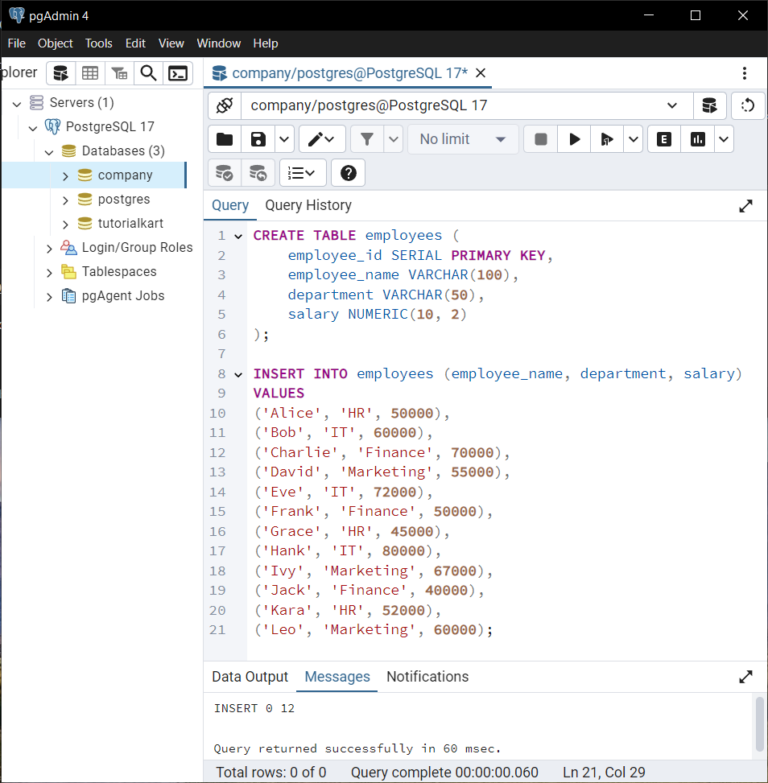
To select the top 10 rows based on a particular column value, use ORDER BY along with LIMIT. For instance, retrieving the top 10 highest salaries: SELECT * FROM employees ORDER BY salary DESC LIMIT 10;.
3. Using FETCH FIRST Clause
PostgreSQL supports the SQL standard FETCH FIRST clause, which works similarly to LIMIT. Example: SELECT * FROM table_name ORDER BY id FETCH FIRST 10 ROWS ONLY; retrieves the first 10 rows ordered by id.
4. Using Window Functions with ROW_NUMBER()
Window functions can assign row numbers to each result. To select the top 10 rows per category, use ROW_NUMBER(). Example: SELECT * FROM (SELECT *, ROW_NUMBER() OVER (ORDER BY score DESC) AS rn FROM players) sub WHERE rn <= 10;.
5. Using OFFSET for Pagination
When dealing with pagination, combine LIMIT and OFFSET to select specific rows. For example, to get rows 11 to 20: SELECT * FROM table_name ORDER BY id LIMIT 10 OFFSET 10;.
6. Selecting Top 10 Distinct Rows
To ensure uniqueness, use DISTINCT with LIMIT. For example, SELECT DISTINCT city FROM customers LIMIT 10; fetches unique cities, limiting the result to 10.
7. Using CTID to Select Physical First 10 Rows
The ctid is a system column representing row location. You can query: SELECT * FROM table_name ORDER BY ctid LIMIT 10; to return the first 10 physical rows as stored on disk, though this is rarely recommended for logical row ordering.
8. Selecting Top 10 Rows Using Subqueries
Sometimes a subquery helps to filter top values first and then join on other tables. Example: SELECT * FROM orders WHERE order_id IN (SELECT order_id FROM orders ORDER BY total DESC LIMIT 10);.
9. Using DISTINCT ON for Selecting Top Rows Per Group
DISTINCT ON extracts the first row per group by ordering. For example, to get the latest order per customer: SELECT DISTINCT ON (customer_id) * FROM orders ORDER BY customer_id, order_date DESC LIMIT 10;.
10. Using ARRAY_AGG with ORDER BY and LIMIT
To aggregate and limit within grouped rows, you can use ARRAY_AGG with ORDER BY and slice the array: SELECT customer_id, ARRAY_AGG(product_id ORDER BY purchase_date DESC)[1:10] FROM purchases GROUP BY customer_id;.
11. Using CURSOR to Fetch Top Rows in a Session
Cursors allow fetching rows incrementally in client applications. Open a cursor with a query, then FETCH 10 FROM cursor_name; to retrieve top 10 rows stepwise, useful for large datasets.
12. Using Table Sampling for Random Rows
To get random rows, use TABLESAMPLE SYSTEM. For example, SELECT * FROM table_name TABLESAMPLE SYSTEM (1) LIMIT 10; randomly samples approximately 1% of rows, then limits to 10.
13. Combining WHERE Clause with ORDER BY and LIMIT
Apply conditions before limiting rows. Example: SELECT * FROM sales WHERE region = 'East' ORDER BY sale_date DESC LIMIT 10; returns the top 10 recent sales in the East region.
14. Selecting Top 10 Rows with GROUP BY and HAVING
When summarizing, group rows and filter with HAVING, then limit results. For example, SELECT customer_id, COUNT(*) FROM orders GROUP BY customer_id HAVING COUNT(*) > 5 ORDER BY COUNT(*) DESC LIMIT 10;.
15. Using Common Table Expressions (CTE) for Readability
CTEs enhance clarity while selecting top rows. Example: WITH ranked AS (SELECT *, ROW_NUMBER() OVER (ORDER BY score DESC) AS rn FROM players) SELECT * FROM ranked WHERE rn <= 10;.
16. Using DISTINCT with ORDER BY and LIMIT to Avoid Skewed Results
When ordering is combined with DISTINCT, it’s important to limit after distinct filtering. Example: SELECT DISTINCT ON (category) * FROM products ORDER BY category, price DESC LIMIT 10;.
17. Using Temporary Tables for Complex Queries
Store intermediate results in a temporary table, then select top 10 rows from it. This helps when the initial query is complex or expensive: CREATE TEMP TABLE temp_results AS SELECT ...; followed by SELECT * FROM temp_results LIMIT 10;.
18. Ordering by Multiple Columns Before LIMIT
You can order by more than one column for precise top row selection. For example: SELECT * FROM scores ORDER BY level DESC, score DESC LIMIT 10; prioritizes level first, then score.
19. Selecting Top 10 Rows Using ORDER BY NULL for Performance
If order does not matter and you just want any 10 rows, use ORDER BY NULL with LIMIT to avoid sorting overhead: SELECT * FROM big_table ORDER BY NULL LIMIT 10;.
20. Utilizing Indexes to Optimize Top 10 Row Queries
Indexes on columns used in ORDER BY clauses can significantly speed up top row retrieval. For example, having an index on salary helps queries like SELECT * FROM employees ORDER BY salary DESC LIMIT 10; run more efficiently.
FAQ
What is the LIMIT clause used for in PostgreSQL?
The LIMIT clause restricts the number of rows returned by a query, helpful to fetch a subset such as the top 10 rows.
How can I get the top 10 highest values in a column?
Use ORDER BY column_name DESC with LIMIT 10 to retrieve rows with the highest values.
What are window functions used for in selecting top rows?
Window functions like ROW_NUMBER() enable selecting top rows within groups by assigning row numbers based on ordering.
Why use DISTINCT ON in PostgreSQL?
DISTINCT ON allows selecting the first row per group, useful when you want the top row per category or group.
How can I optimize top row queries?
Creating indexes on columns used in ORDER BY clauses can speed up retrieval of top rows significantly.





Leave a Reply