
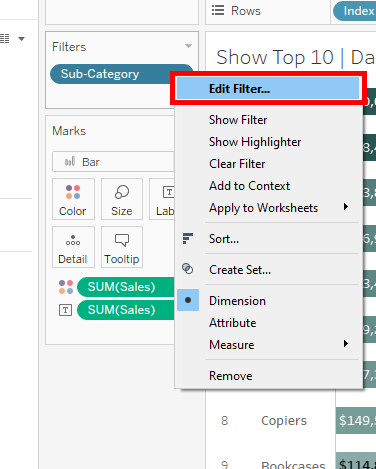
In the realm of data visualization, Tableau stands out as an indispensable tool. One of the most sought-after functionalities within this application is the ability to filter and showcase the top 10 data points effectively. This capability transcends mere aesthetics; it empowers stakeholders to make informed decisions based on streamlined and insightful visuals. Here are the top 10 tips to elevate your Tableau skills and master the art of filtering and displaying the top 10 values like a pro.
1. Utilize Quick Filters Wisely
Quick Filters are your go-to feature for a swift overview of data. Use them to narrow down your options dynamically without bogging down the dashboard with clutter. By implementing a range filter, you can allow users to slice through the dataset with ease. This, in turn, makes it simpler to hone in on the top 10 results—whether it’s revenue, sales figures, or any other metric you’re analyzing.
2. Leverage Rank Calculations
To effectively display the top 10 items, consider employing Tableau’s Rank function. By creating a calculated field that ranks your metrics, you can effortlessly filter out the lower performers. The rank can be determined in ascending or descending order based on your specific needs. This technique provides a robust foundation to build your visualizations upon.
3. Use Parameter Controls for Flexibility
Parameter controls offer a level of flexibility that can be game-changing in your visual analysis. Instead of limiting your users to a static top 10, allow them to manipulate parameters—such as changing the number of displayed items dynamically. This interactivity not only boosts engagement but also makes data exploration more intuitive.
4. Design with Visual Priority
When creating a dashboard, designing with visual priority in mind is crucial. Ensure that your top 10 metrics are easily discernible. Use contrasting colors, bold fonts, or larger sizes to make these elements pop. This way, viewers’ eyes will be naturally drawn to the most critical data points, enhancing the overall storytelling aspect of your visualization.
5. Implement Highlight Actions for Enhanced Insights
Highlight actions can facilitate a deeper understanding of your top 10 data points. By enabling highlight actions when users hover over specific items, you can provide additional context, revealing trends or related information. This interactive feature fosters an engaging user experience, enriching the analysis process.
6. Employ Sets for Greater Depth
Sets are a powerful way to differentiate between the top performers and the rest of the dataset. By creating a set that specifically contains the top 10 items, you can easily maneuver them throughout your dashboards and analyses. This functionality not only simplifies the filtering process but also allows for more advanced calculations involving these specific data points.
7. Master the Art of Tooltips
Tooltips are often underestimated; however, they can provide essential supplementary information without overcrowding your dashboard. Customize tooltips for your top 10 items to include metrics, comparisons, or even historical data. This approach enriches the user experience and provides a multi-dimensional view of your data without the clutter.
8. Time Series Analysis for Top 10 Trends
When analyzing top performers, it’s crucial to consider the temporal dimension. Use time series analyses to assess how your top 10 metrics have trended over time. This can be particularly useful for understanding seasonal variations or long-term growth patterns, enabling stakeholders to make strategic decisions based on historical contexts.
9. A/B Testing for Optimal Presentation
Experimentation is key in the world of data visualization. Consider conducting A/B tests to determine which version of your top 10 presentation resonates better with your audience. By testing different layouts, colors, or formats, you can glean insights into user preferences, ultimately refining your visual strategy to maximize effectiveness.
10. Continuous Iterate and Improve
Tableau is an evolving platform, and so should be your approach to data visualization. After presenting your top 10 analyses, gather feedback to identify areas for improvement. Continuously iterating on your dashboards and refining your techniques will ensure that your visual storytelling remains relevant and impactful, catering to the ever-changing dynamics of your data environment.
In conclusion, mastering the display of top 10 metrics in Tableau is more than just a technical skill—it is an art form that combines analytical thinking and effective storytelling. By implementing these tips, you can enhance not only your proficiency with Tableau but also the value you bring to your organization through informed decision-making facilitated by clear and engaging data visualizations. As you delve into this captivating realm of data, remember that each visualization is an opportunity to unlock deeper insights and foster richer understanding.







Leave a Comment